What kind of cable do I need for a serial port connection between two computers?
For the type of connection we are talking about here, you need a so called ‘null modem cable’. A null modem cable is an RS-232 serial cable where the transmit and receive lines are crosslinked.
How can I test the serial port connection between two computers?
To check that the serial connection between a Linux computer and a windows computer is functional, you can do the following:
- On the Linux PC, open up a putty session by typing putty. Choose serial and type the path for the serial port (e.g., /dev/ttyS0/). The main thing to consider is the baud rate (e.g., 115200), which has to be the same on sending and receiving end.
- On the windows PC, open up a putty session and setup a serial port connection (click on serial), and specify the name of the port where the serial device is connected to (e.g., ‘COM3)’, make sure baud rate is the same as on the Linux machine(i.e. 115200).
- Then once the connection is established you can type in the windows putty display and can then read it from the Linux putty display and vice versa. If this doesn’t work just check the hardware connections.
How to measure the delays of sending and receiving using a serial port connection
Here we need a computer with two serial ports(or two computers). We can send commands on one serial port and receive them on the other and then estimate the delay.
This is what I did on my office PC using FieldTrip commands ft_read_event and ft_write_event.
delete(instrfind);
fclose('all');
clear all;
close all;

addpath('H:\common\matlab\fieldtrip\');
% addpath('H:\common\matlab\fieldtrip\private\');
%% filetype_check_uri and ft_filter_event need to be in the path
%% Note the syntax: serial:`<port>`?key1=value1&key2=value2&...
%% here key1 is BaudRate and value1 is 115200

%% write something to serial port 4
cfg.istream ='serial:COM4?BaudRate=115200';
%% and receive it on serial port 1 (serila ports are physically connected)
cfg.ostream ='serial:COM1?BaudRate=115200';
event.value=5; %% This can be a string or an integer, e.g., 1 or 'Rock_n_Roll_will_never_dye', however longer strings will take longer to be communicated
count=0;
tlop=[];
while true
count=count+1;
%% write
ft_write_event(cfg.istream,event,'eventformat','fcdc_serial');
tic
%% read
ww=ft_read_event(cfg.ostream,'eventformat','fcdc_serial');
%% measure time
t1=toc;
tlop=[tlop,t1];
%% disp received event
disp(ww);
pause(0.15); %% give serial port a break
if count>1000
  break
end
end


figure
plot(tlop*1000,'.');
xlabel('function calls');
ylabel('delay read write event [ms]');

modal_val=mode(tlop(2:end)*1000)
median_val=median(tlop(2:end)*1000)
range_val=range(tlop(2:end)*1000)

gtext({'mode :';'median :';'range:'});
gtext(num2str(modal_val));
gtext(num2str(median_val));
gtext(num2str(range_val));
%% close what we have opened
fclose('all');
What I got looks like this:
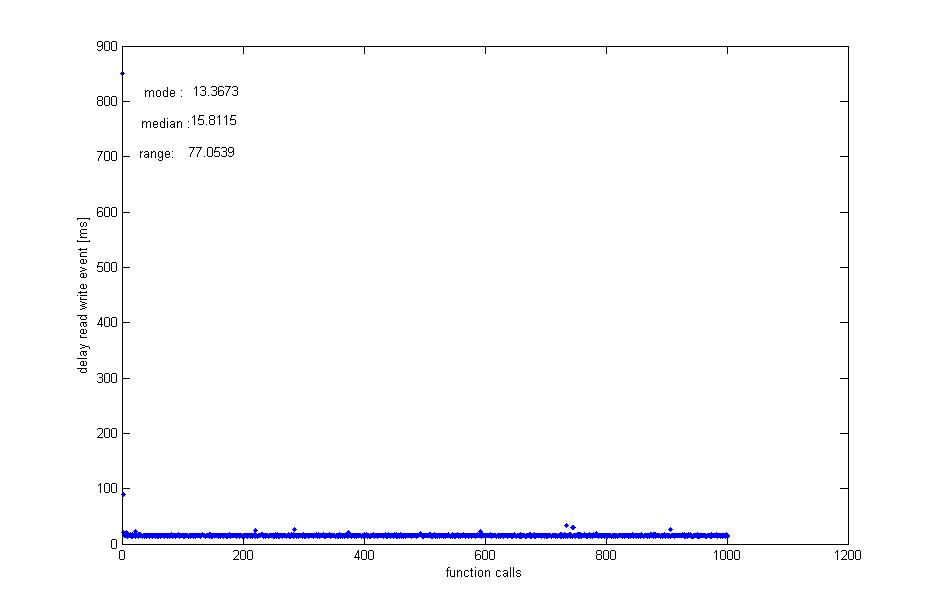
Alternatively, one can simply use MATLAB serial objects and low-level reading function fread or fscan
%% objects are cleared
clear all;
delete(instrfind);
fclose('all');

%% define 1st serial port on COM1
serobjw = serial('COM1');              % Creating serial port object now its connected to COM7
serobjw.Baudrate = 115200;             % Set the baud rate at the specific value
set(serobjw, 'Parity', 'none');        % Set parity as none
set(serobjw, 'Databits', 8);           % set the number of data bits
set(serobjw, 'StopBits', 1);           % set number of stop bits as 1
set(serobjw, 'Terminator', 10);        % set the terminator value to newline
set(serobjw, 'OutputBufferSize', 512); % Buffer for write operation, default it is 512
get(serobjw) ;
%% open it
fopen(serobjw);

%% define 2nd serial port on COM4
serobjw2 = serial('COM4');             % Creating serial port object now its connected to COM7
serobjw2.Baudrate = 115200;            % Set the baud rate at the specific value
set(serobjw2, 'Parity', 'none');       % Set parity as none
set(serobjw, 'Databits', 8);           % set the number of data bits
set(serobjw, 'StopBits', 1);           % set number of stop bits as 1
set(serobjw, 'Terminator', 10);        % set the terminator value to newline
set(serobjw, 'OutputBufferSize', 512); % Buffer for write operation, default it is 512
get(serobjw) ;

%% open it
fopen(serobjw2);

count=0
tlop=[];
while 1
  count=count+1;
  %% write to COM1
  fwrite(serobjw,5); %% can be numeric or a string
  tic
  if ~isempty(serobjw2.BytesAvailable)
      if serobjw2.BytesAvailable~=0
          %% read from COM4 (physically connected to COM1)
          a=fread(serobjw2,serobjw2.BytesAvailable);disp(a);
          clear a;
          %% to convet numeric ASCII code to char string use a=char(a')
          %% the line below will also work for char input
          % a=fscanf(serobjw2,'%s\n',serobjw2.BytesAvailable),clear a;
          t1=toc;
          tlop=[tlop,t1];
          if count>1000
              break
          end
      end
  end
    pause(0.15); %% give serial a break
end
figure
plot(tlop*1000,'.');
xlabel('function calls');
ylabel('delay read write, MATLAB serial [ms]');

modal_val=mode(tlop(2:end)*1000)
median_val=median(tlop(2:end)*1000)
range_val=range(tlop(2:end)*1000)

gtext({'mode :';'median :';'range:'});
gtext(num2str(modal_val));
gtext(num2str(median_val));
gtext(num2str(range_val));
%% close what we have opened
fclose('all');
delete(instrfind);
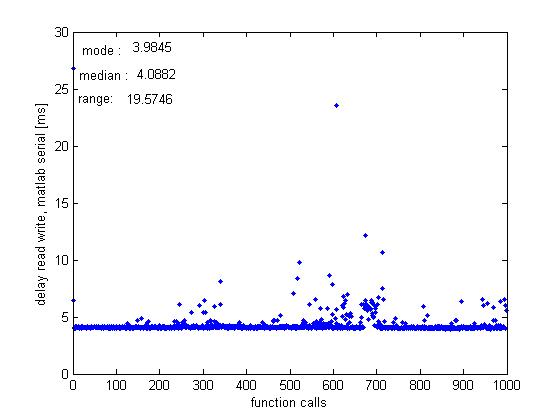
The picture looks similar, only slightly faster.