How can I monitor a subject’s head position during a MEG session?
The CTF/Neuromag acquisition software provides a shared memory in which the the data from the MEG channels and all auxiliary channels are available in real-time. The acq2ftx/neuromag2ft application transfers this data from the shared memory to a FieldTrip buffer on the acquisition computer. MATLAB software running on another computer can then be used to analyze the real-time data. See the getting started page for setting up this interface on your MEG system.
Please cite this paper when you use the realtime head localizer in your research:
Stolk A, Todorovic A, Schoffelen JM, Oostenveld R. Online and offline tools for head movement compensation in MEG. Neuroimage, 2013.
Acquiring the head shape for more realistic visualization
Monitoring the head position can be done by visualizing the head shape in 3 different ways: as a sphere, using head shape points acquired with the Polhemus (mostly from the upper part of the head) or with a realistic head shape including facial details acquired with a 3D-Scanner like this.
Sphere
Visualizing the head as a sphere requires no further action.
Polhemus
During the preparation for the MEG measurement the fiducials and additional points of the head surface are digitized with the Polhemus. We recommend to acquire additional points on the brow ridge, cheekbone and along the nose; this will help not only in coregistration but also in visualizing the head shape. In a case of EEG/MEG the locations of the electrode locations can also be measured and used for the visualization. All these points together can be used for visualizing the head shape during the on- and offline visualization of the head movements.
3D-Scanner
The head shape can also be measured with a 3D-Scanner like this one to acquire a realistic representation of the subject. Prior to using the scanned head shape, it has to be preprocessed. The 3D-Scanner stores the head shape in its own device coordinate system and therefore needs to realigned to the respective coordinate system.
In the first step we localize the fiducials on the head shape:
headshape = ft_read_headshape('Model.obj');
cfg = [];
cfg.method = 'headshape';
fid = ft_electrodeplacement(headshape);
After the localization of the fiducials we realign the head shape to the respective coordinate system:
cfg = [];
cfg.coordsys     = 'ctf';           % or neuromag
cfg.fiducial.nas = fid.elec(1,:);   % position of nasion
cfg.fiducial.lpa = fid.elec(2,:);   % position of LPA
cfg.fiducial.rpa = fid.elec(3,:);   % position of RPA
headshape_coreg  = ft_meshrealign(headshape)
Now we have the head shape in the correct coordinate system and can use it for on- and offline head localization.
Monitor a subject’s head position during a MEG session
After initializing the MEG system, one starts the acq2ft/neuromag2ft application. When subsequently starting Acquisition, the data is transferred in realtime to the FieldTrip buffer which can be read from any computer connected through a network. Point to the location of the buffer by correctly specifying cfg.dataset like this:
cfg = [];
cfg.dataset = 'buffer://hostname:1972';     % get data from buffer
ft_realtime_headlocalizer(cfg)
To improve the real time head movement compensation, we can also specify a realistic head shape and a realistic model of the dewar:
cd <path_to_fieldtrip/template/dewar
load ctf                                    % or neuromag

cfg = [];
cfg.dataset = 'buffer://hostname:1972';     % get data from buffer
cfg.dewar   = ctf_dewar;
cfg.head    = headshape_ctf;
ft_realtime_headlocalizer(cfg)
Repositioning within a single recording session
This can be achieved by marking the head position indicator (HPI) coil positions at an arbitrary point in time, operationalized through clicking the ‘Update’ button. Black unfilled markers should appear which indicate the positions of the coils at the moment of buttonpress. Distance to these marked positions then become colorcoded.
Repositioning between multiple recording sessions
You can reposition to i.e. to a previous recording session by specifying cfg.template. Either by pointing to another dataset; e.g., cfg.template = ‘subject01xxx.ds’ (CTF275 systems only), or by pointing to a text file created by clicking the Update button during a previous recording session; e.g., cfg.template = ‘29-Apr-2013-xxx.txt’ (CTF275 and Neuromag systems).
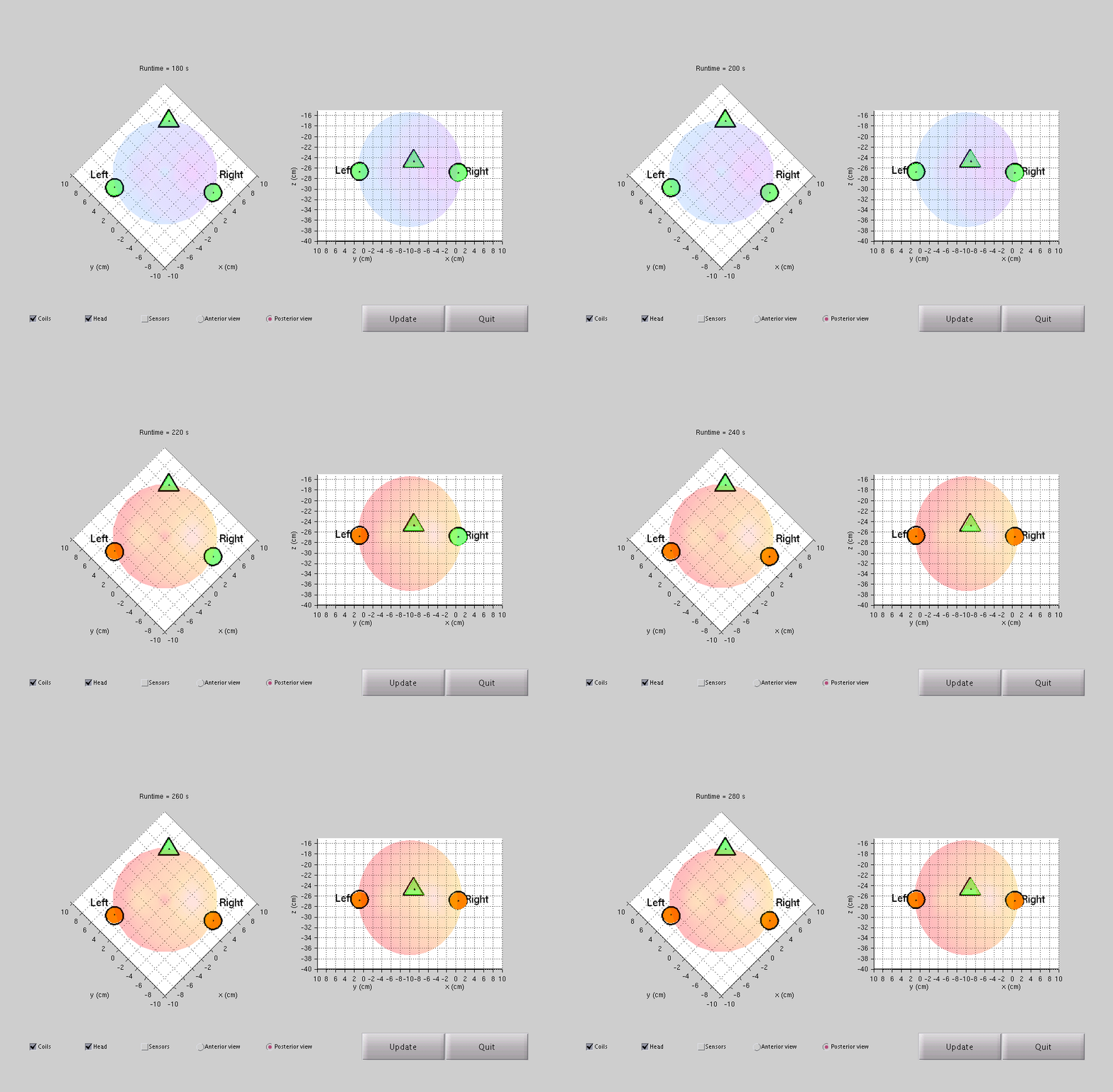
Figure 1: Top (left plot) and back view (right plot) of the subject’s head. Nasion is represented by a triangular marker and both auricular points by circular markers. To aid the subject with repositioning, the real-time fiducial positions are color coded to indicate the distances to the targets (green < 1.5 mm, orange < 3 mm, and red > 3 mm). If all three markers are within limits, the head turns light blue (CTF only). Click on the image for the animation.
Replaying a subject’s recorded head position
In stead of reading data from the shared memory, one now reads data from a previously recorded MEG dataset. This can be done offline, on any computer running a recent version of MATLAB.
cfg.bufferdata = 'first';                 % read data from first until last segment
cfg.template   = 'previousdataset.ds';
cfg.dataset    = 'previousdataset.ds';
ft_realtime_headlocalizer(cfg)
Before we can replay the data acquired with the Neuromag/Elekta/MEGIN system, the data has to be preprocessed with maxfilter. The first possibility is to add the relevant information to .fif file with MaxMove (see also under further reading).
The other option is to use maxfilter to create an ASCII file containing the relevant information about head movement. Under ‘Head position estimation’ the button ‘Save head postions in an ASCII file’ just need to be pressed (see also under further reading).
cfg.bufferdata   = 'first';                 % read data from first until last segment
cfg.template     = 'previousdataset';
cfg.dataset      = 'previousdataset';
cfg.headmovement = 'maxfilter.pos';
ft_realtime_headlocalizer(cfg)
CTF specific protocol
-
‘Initialize the MEG system’.
-
‘Start acq2ftx for real-time head localization’.
-
‘Start Acq’. You should see activity in the terminal in which acq2ftx is running.
-
Start MATLAB on the ‘real-time computer’ by typing on the Linux command line
matlab79 -
Visualize the subject’s head in real-time. At the Donders, Odin is the default FieldTrip buffer location and therefore, cfg.dataset does not need specification.
cfg = []; ft_realtime_headlocalizer(cfg) -
You can project the head localizer into the MSR by one buttonclick. Click the left button on the video matrix and the signal from the presentation computer is being overwritten by the head localizer computer. This way both experimenter and subject get to see the virtual representation of the subject’s head.
-
You can also reposition the subject according to a previous session. The headlocalizer dedicated computer has access to Odin’s data directory, and thus, the headcoil coordinates. This is the .hc file, located in the .ds directory. Specify the template as follows and run the headlocalizer which should give you the markers from the start.
cfg.template = '/mnt/megdata/20100812/ArjSto_1200hz_20100812_01.ds';
ft_realtime_headlocalizer(cfg)
Keep in mind that Odin’s data directory is automatically cleaned every now and then. If your template dataset has been removed, you could still read it from your own M disk in case you have backed it up there. Logout the meg user on the headlocalizer dedicated computer and login as yourself. Now run the headlocalizer with specifying the file location on your M disk (e.g., cfg.template = ‘/home/action/arjsto/MEG/ArjSto_1200hz_20100812_01.ds’).
Elekta specific protocol
Currently the option for online monitoring is only available for the CTF system. The Neuromag/Elekta/Megin real-time data stream can already be processed in FieldTrip, however, the relevant information in real time data stream is currently missing. However, in principle it would look similar to CTF specific protocol
- ‘Initialize the MEG system’.
- ‘Start neuromag2ft for real-time head localization’.
- ‘Start Acq’. You should see activity in the terminal in which neuromag2ft is running.
- Start MATLAB on the ‘real-time computer’
-
Visualize the subject’s head in real-time.
cfg = [];
cfg.dataset = 'buffer://server:port'
ft_realtime_headlocalizer(cfg)
Further reading
For further reading of real time head localizer please read this paper.
The above online head localization procedure can substantially reduce the influence of head movement within a session, e.g., using short repositioning instructions between experimental blocks, and also allows for accurate repositioning between sessions. However, residual head movement is likely to negatively impact statistical sensitivity and one may want to consider to incorporate information about these head movements into the offline analysis. For instance, incorporation of head position time series into the general linear model, using ft_regressconfound, has been found to improve statistical sensitivity up to 30%.
Furthermore, despite using the Polhemus to localize electrode locations we can use the structure.io to localize them. You can find the tutorial here. This means we do not need the Polhemus for our experimental procedure and therefore reduce the preparation time by having less to measure.
For the Neuromag/Elekta/MEGIN system the Maxfilter User’s guide Chapter 4 MaxMove provides further information on offline head movement visualization and compensation.
For more information about the CTF head localization we recommend Head Localization Guide CTF MEG Software.