Make leadfields using different headmodels
Introduction
These scripts demonstrate how to compute and compare some different MEG headmodels that are available in FieldTrip.
For all functions used, you can type ‘help function’ in MATLAB for more information.
The MEG dataset that is used in this demo is available from https://download.fieldtriptoolbox.org/tutorial/ and is named Subject01.zip.
If you download this data into a folder named ‘testdata’, the directory should look like this:
>> cd testdata
>> ls
Subject01.ds   Subject01.mri    Subject01.shape_info
Subject01.hdm  Subject01.shape
Single sphere model from CTF
%--------------------------------------------------------------------------------------
% making a leadfield using the single-sphere headmodel that is
% produced with CTF software
%--------------------------------------------------------------------------------------

% read header, which contains the gradiometer description
hdr  = ft_read_header('Subject01.ds');
grad = hdr.grad;

% read headshape
shape = ft_read_headshape('Subject01.shape');
shape = rmfield(shape, 'fid'); %remove the fiducials->these are stored in MRI-voxel

% read in the single sphere models produced with CTF software
ctf_ss = ft_read_headmodel('Subject01.hdm');

% plotting the head model together with the head shape
ft_plot_sens(grad);
ft_plot_headmodel(ctf_ss, 'facecolor', 'cortex');
ft_plot_headshape(shape);

% prepare the leadfield for the single sphere model
cfg                  = [];
cfg.grad             = grad;
cfg.headmodel        = ctf_ss;
cfg.resolution       = 1;
cfg.unit             = 'cm';
sourcemodel_ctf_ss   = ft_prepare_leadfield(cfg);

% use the same geometry for the grid in what is to follow
sourcemodel = removefields(sourcemodel_ctf_ss, {'leadfield', 'leadfielddimord', 'label'});
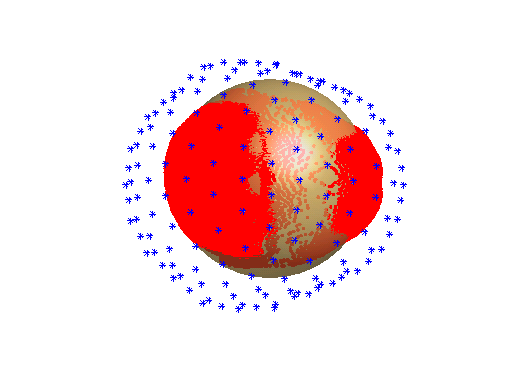
CTF headmodel, single sphere:
Local spheres model from CTF
%--------------------------------------------------------------------------------------
% making a leadfield using the localSpheres headmodel that is produced with CTF software
%--------------------------------------------------------------------------------------

% read in the local spheres model produced with CTF software
ctf_ls = ft_read_headmodel(fullfile('Subject01.ds', 'default.hdm'));

% plotting the headmodel
ft_plot_sens(grad, 'unit', 'cm');
ft_plot_headmodel(ctf_ls, 'facecolor', 'cortex', 'grad', grad, 'unit', 'cm');
ft_plot_headshape(shape, 'unit', 'cm');

% prepare_leadfield;
cfg                 = [];
cfg.grad            = hdr.grad;
cfg.headmodel       = ctf_ls;
cfg.sourcemodel     = sourcemodel;
sourcemodel_ctf_ls  = ft_prepare_leadfield(cfg);
CTF headmodel, local spheres:
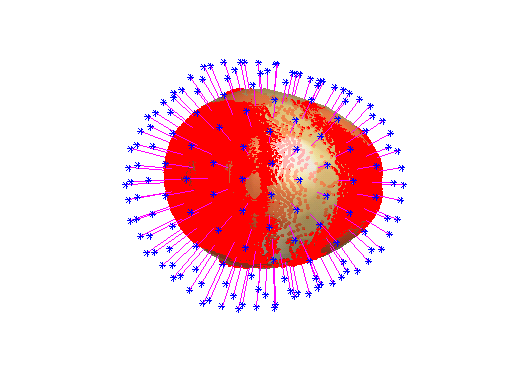
Local spheres model from FieldTrip, using the CTF headshape
%--------------------------------------------------------------------------------------
% making a leadfield using ft_prepare_headmodel implemented in FieldTrip
% using the headshape produced with CTF software
%--------------------------------------------------------------------------------------

% ft_prepare_headmodel using localspheres (for information type 'help ft_prepare_headmodel')
cfg           = [];
cfg.method    = 'localspheres';
cfg.headshape = shape;
cfg.grad      = grad;
cfg.feedback  = false;
ls_headshape  = ft_prepare_headmodel(cfg);

% plotting the headmodel
ft_plot_sens(grad, 'unit', 'cm');
ft_plot_headmodel(ls_headshape, 'facecolor', 'cortex', 'grad', grad, 'unit', 'cm');
ft_plot_headshape(shape, 'unit', 'cm');

% prepare_leadfield for local spheres headmodel with ctf headshape
cfg                 = [];
cfg.grad            = hdr.grad;
cfg.headmodel       = ls_headshape;
cfg.sourcemodel     = sourcemodel;
sourcemodel_ls_headshape = ft_prepare_leadfield(cfg);
FieldTrip headmodel, local spheres with CTF headshape:
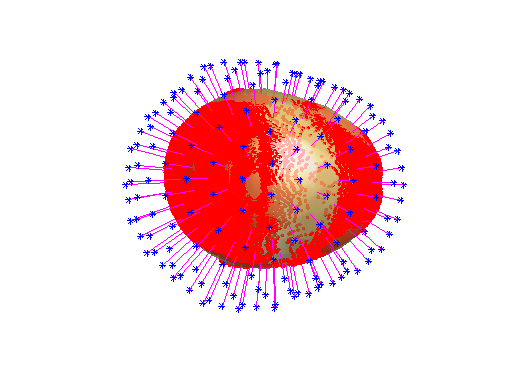
Local spheres model from FieldTrip, using brain surface from segmented mri
%--------------------------------------------------------------------------------------
% making a leadfield using the local spheres model implemented in FieldTrip
% using a segmented mri produced with ft_volume_segment in FieldTrip
% (see the bottom of this page for how to make a segmented mri and check it for flipped
% dimensions)
%--------------------------------------------------------------------------------------

% read mri and reslice
mri = ft_read_mri('Subject01.mri');
cfg = [];
cfg.dim = mri.dim;
mri = ft_volumereslice(cfg, mri);

% plot mri
cfg = [];
ft_sourceplot(cfg, mri);

% save mri for future use
save mri mri

% segmentation
cfg = [];
cfg.output = {'gray', 'white', 'csf', 'skull', 'scalp'};
segmentedmri = ft_volumesegment(cfg, mri);
save segmentedmri segmentedmri

% ft_prepare_headmodel (for information type 'help ft_prepare_headmodel' in matlab)
cfg           = [];
cfg.grad      = grad;
cfg.method    = 'localspheres';
cfg.tissue    = 'brain'; % will be constructed on the fly from white+grey+csf
ls_mri        = ft_prepare_headmodel(cfg, segmentedmri);
ls_mri        = ft_convert_units(ls_mri, 'cm');

% plotting the headmodel
ft_plot_sens(grad);
ft_plot_headmodel(ls_mri, 'facecolor', 'cortex');

% ft_prepare_leadfield for the local spheres headmodel produced using a segmented mri
cfg                  = [];
cfg.grad             = grad;
cfg.headmodel        = ls_mri;
cfg.sourcemodel      = sourcemodel;
sourcemodel_ls_mri   = ft_prepare_leadfield(cfg);
FieldTrip headmodel, local spheres based on segmented mri:
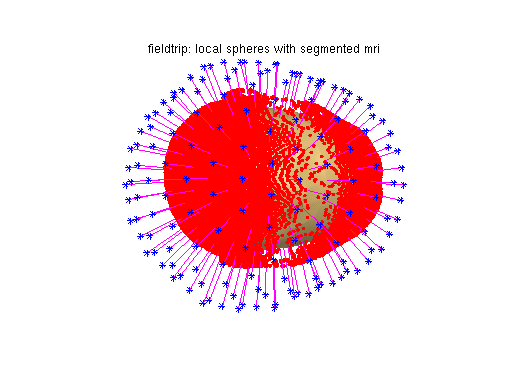
Realistic single-shell model, using brain surface from segmented mri
%--------------------------------------------------------------------------------------
% making a leadfield using ft_prepare_singleshell (developed by Nolte) implemented in FieldTrip
% using a segmented mri produced with ft_volumesegment in FieldTrip
% (see the bottom of this page for how to make a segmented mri and check it for flipped
% dimensions)
%--------------------------------------------------------------------------------------

% ft_prepare_headmodel (for information type 'help ft_prepare_headmodel' in matlab)
cfg           = [];
cfg.grad      = grad;
cfg.method    = 'singleshell';
cfg.tissue    = 'brain'; % will be constructed on the fly from white+grey+csf
singleshell   = ft_prepare_headmodel(cfg, segmentedmri);
singleshell   = ft_convert_units(singleshell, 'cm');

% plotting the headmodel
ft_plot_sens(grad, 'unit', 'cm');
ft_plot_headmodel(singleshell, 'facecolor', 'cortex', 'unit', 'cm');

% ft_prepare_leadfield for the Nolte headmodel, created using FieldTrip
cfg                = [];
cfg.grad           = grad;
cfg.headmodel      = singleshell;
cfg.sourcemodel    = sourcemodel;
sourcemodel_singleshell   = ft_prepare_leadfield(cfg);
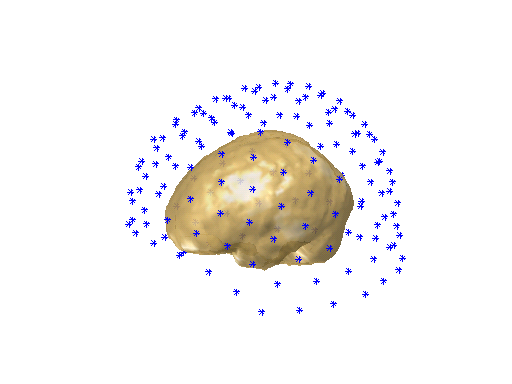
Single-shell headmodel, realistic geometry:
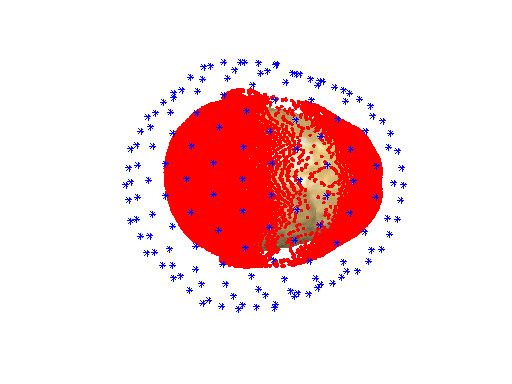
Single-shell headmodel, displayed without headshape and rotated:
Comparing the forward models
%----------------------------------------------------------------------------------------------------------
% compute the amplitudes of the leadfields
%----------------------------------------------------------------------------------------------------------
grid = {};
grid{1} = sourcemodel_ctf_ss;
grid{2} = sourcemodel_ctf_ls;
grid{3} = sourcemodel_ls_headshape;
grid{4} = sourcemodel_ls_mri;
grid{5} = sourcemodel_singleshell;

ampl = {};
for i=1:5
  ampl{i} = nan(grid{i}.dim);
  for k=find(grid{i}.inside(:)')
    ampl{i}(k) = sqrt(sum(grid{i}.leadfield{k}(:).^2));
  end
end

% interpolating the data to the mri for plotting
sourceinterp = {};
for i=1:5
    cfg             = [];
    cfg.parameter   = 'ampl';
    source          = grid{i};
    source.ampl     = ampl{i};
    sourceinterp{i} = ft_sourceinterpolate(cfg, source, mri);
end

% plotting the amplitudes
cfg               = [];
cfg.funparameter  = 'ampl';
cfg.method        = 'slice';
ft_sourceplot(cfg, sourceinterp{1});
ft_sourceplot(cfg, sourceinterp{2});
ft_sourceplot(cfg, sourceinterp{3});
ft_sourceplot(cfg, sourceinterp{4});
ft_sourceplot(cfg, sourceinterp{5});

%--------------------------------------------------------------------------------------------
% compute the correlations between the different leadfields
% NOTE: to be able to compare them you should recalculate the leadfields with the grid
% specifications that are the same for all models, e.g., taking them from the single-shell model,
% so rather than specifying cfg.resolution you would specify
% cfg.sourcemodel.pos     = sourcemodel_singleshell.pos;
% cfg.sourcemodel.unit    = sourcemodel_singleshell.unit;
% cfg.sourcemodel.inside  = sourcemodel_singleshell.inside;
%--------------------------------------------------------------------------------------------
comp = {};
for i=1:5
  for j=(i+1):5
   disp([i j]);
   a = grid{i};
   b = grid{j};
   assert(isequal(grid{i}.dim,grid{j}.dim));
   comp{i, j} = nan(grid{i}.dim);
   for k=find(a.inside(:)')
     dum = corrcoef(a.leadfield{k}(:), b.leadfield{k}(:));
     comp{i, j}(k) = dum(1, 2);
   end
  end
end

% interpolate the data on an mri for plotting the correlations between the leadfields
cfg                 = [];
cfg.parameter       = 'pow';
source              = grid{1};
source.dim          = grid{5}.dim;
sourceinterp        = {};
for i=1:5
  for j=(i+1):5
    source.avg.pow     = comp{i, j};
    sourceinterp{i, j} = ft_sourceinterpolate(cfg, source, mri);
  end
end

% plotting the correlations
cfg                 = [];
cfg.funparameter    = 'pow';
cfg.nslices         = 12;
cfg.colmax          = 1;
cfg.colmin          = 0.8;
cfg.spacemin        = 75;
cfg.spacemax        = 150;
figure;
ft_sliceinterp(cfg, sourceinterp{1, 2});
figure;
ft_sliceinterp(cfg, sourceinterp{2, 3}); % etcetera...
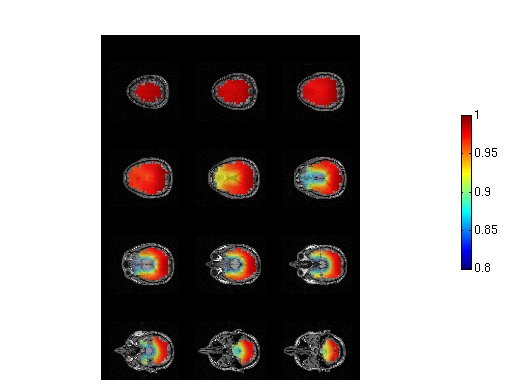
Correlations between the leadfields computed based on the FieldTrip localspheres model based on the CTF headshape and the realistic single-shell headmodel
Appendix: creating a segmentation of the MRI
%-------------------------------------------------------------------------------
% make segmented mri with volumesegment
%-------------------------------------------------------------------------------

mri          = ft_read_mri('Subject01.mri');
cfg          = [];
cfg.name     = 'segment';
segmentedmri = ft_volumesegment(cfg, mri);

% check segmented volume against mri
mri.brainmask = segmentedmri.gray+segmentedmri.white+segmentedmri.csf;

cfg              = [];
cfg.interactive  = 'yes';
cfg.funparameter = 'brainmask';
figure;
ft_sourceplot(cfg, mri);