CTF
Introduction
The CTF system is one of most widely used MEG systems and one of the first on which real-time MEG analysis has been done for the purpose of BCI (see Mellinger et al., NeuroImage 2007). There are 151-channel and 275-channel systems, which all provide real-time access to the MEG data through shared memory.
The acquisition software runs on a Linux computer. When prior to starting the acquisition software, shared memory with the appropriate details is initialized, the acquisition software will write a copy of the data to that shared memory. The shared memory is split over 600 packets, where each packet holding 28160 samples for older versions of the software or 40000 samples for newer versions of the software. With approximately 350 channels (MEG, EEG and status/trigger channels) in the typical MEG system, that amounts to approximately 80 (old) or 114 (new) samples per packet.
A specific application for the CTF real-time interface is to monitor and minimize movements of the subject’s head during data acquisition. This makes use of the continuous head localization (CHL) channels and is described in detail here.
Interface with MATLAB and FieldTrip
Multiple real-time interfaces have been developed over the years.
Version 1 using shared memory
The first version (ctf2ft_v1, originally known as AcqBuffer) only maintains the shared memory to allow it to be used as an ever-lasting ring buffer, but does not copy the data to the FieldTrip buffer. This version can be used in combination with the ft_realtime_ctfproxy.m function in MATLAB running on the acquisition computer. The header details must be read from the res4 file on the local filesystem. Although now deprecated, this is explained in more detail further down on this page.
Version 2 using network-transparent interface
The second version (ctf2ft_v2, originally known as acq2ft) combines the access to shared memory with copying to the FieldTrip buffer to make the data available elsewhere on the network. It operates by grabbing one packet (setup or data) at a time out of the shared memory, and more or less directly transferring it into a FieldTrip buffer that is started by the ctf2ft_v2 application itself, or a buffer that is running separately on the same computer or elsewhere on the network.
The ctf2ft_v2 application decodes header information from the .res4 file pointed to by the setup collection packet, and thus knows by itself which channels contain triggers instead of relying on a 3rd application or MATLAB script to write that information back to shared memory. On top of that, ** ctf2ft_v2** overallocates the shared memory by 1000 samples and is prepared to operate successfully even if the proprietary Acq application writes too much data into any slot. Instead of preparing the shared memory segment for access by a third application, it streams the data and events (decoded from the trigger channels) to a local or remote FieldTrip buffer, as depicted by the following diagram
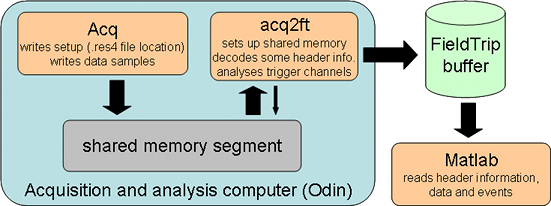
You need to start ctf2ft_v2 before starting Acq so that the shared memory interface can be detected and connected to by the latter. You have the option of spawning a FieldTrip buffer server directly within ctf2ft_v2, using
ctf2ft_v2
to use the default port 1972, or using (note the minus)
ctf2ft_v2 - port
to spawn at server at the given “port”. You can also tell ctf2ft_v2 to stream the data to a buffer provided by another application (possibly on another machine), using
ctf2ft_v2 hostname port
Please note that for this to work, you will need to start up the remote buffer before ctf2ft_v2. Once ctf2ft_v2 is happily up and running, you can start Acq from a different command line or using existing GUI tools.
Since streaming the data to a remote FieldTrip buffer might incur a delay due to network traffic, ctf2ft_v2 employs an internal ring buffer for up to 10 data packets and a simple (socket pair) mechanism to synchronize between copying data packets from the shared memory to the internal ring buffer, and streaming the data from the ring buffer to the FieldTrip buffer. This means that small delays should not interfere with the time-critical operation of clearing up slots in the shared memory segment, as long as the average throughput is high enough.
Version 3 with downsampling, channel selection, applying gains
The most recent interface, called ctf2ft_v3, does everything that version 2 does, but has the additional ability to downsample the incoming CTF data, apply the correct sensor gains, and write out only selected channels. This application is started like this:
ctf2ft_v3 hostname:port:flags:decimation:channels
where “flags” can be any combination of R, which enables writing the “.res4” file into the FieldTrip buffer header, E which enables sending events as decoded from the trigger channels, and G which enables multiplying the samples by the correct gain values, and consequently writing out single precision floating point numbers instead of the default 32-bit integers. “Decimation” needs to be a positive integer number, and “channels” is a comma-separated list of channel labels, or a star (*) for sending all channels. However, it is important to note that *no* lowpass filtering is applied before decimation, that is, you have to use the hardware filters (setup in Acq) to use this option.
ctf2ft_v3 -:1972:RE:1:*
Actually you can have multiple definitions and stream different parts of the data to different buffers. For example, the following call will spawn a local FieldTrip buffer on port 1972, which will receive all channels, the “.res4” header, and events (but data is kept at 32-bit integers), and in addition stream out 4x downsampled and scaled head-localization channels to a buffer on the lab-meg001 computer (also port=1972
ctf2ft_v3 -:1972:RE:1:*
lab-meg001:1972:G:4:HLC0011,HLC0012,HLC0013,HLC0021,HLC0022,HLC0023,HLC0031,HLC0032,HLC0033
Note that the previous command should all be on a single line.
Compilation
On the command line, change to the “realtime/acquisition/ctf” directory and type “make”. This will produce all versions of the interface, as well as some tools for testing and managing the shared memory. Note that you might need to compile the buffer library first.
Original v1 interface using shared memory
This documentation is for historical purposes only, its use is not recommended. The ctf2ft_v3 implementation has been extensively tested at the DCCN and should be used instead.
In FieldTrip it is possible to use the fileio module to read from shared memory. Because the shared memory also has to be freed to ensure that the Acq software continues writing to it, the ctf2ft_v1 application has to be running in the background. It constantly loops over the 600 packets in shared memory, and if there are less than 20 packets free, it memcpy’s the “setup” packet (containing the name of the res4 file that has the full header details in it) to the next packet, thereby freeing the packet previously containing the setup. This procedure ensures that the content of the setup packet can always be read, even while it is being copied.
Using MATLAB to copy data from shared memory to FieldTrip buffer
The ft_realtime_ctfproxy function (part of the realtime module in FieldTrip) reads the MEG data from shared memory and writes to a FieldTrip buffer. The FieldTrip buffer is a multi-threaded and network transparent buffer that allows data to be streamed to it, while at the same time allowing another MATLAB session on the same or another computer to read data from the buffer for analysis.
Subsequently in another MATLAB session you can read from the FieldTrip buffer using the ft_read_header, ft_read_data and ft_read_event functions by specifying 'buffer://hostname:port' as the filename to the reading functions.
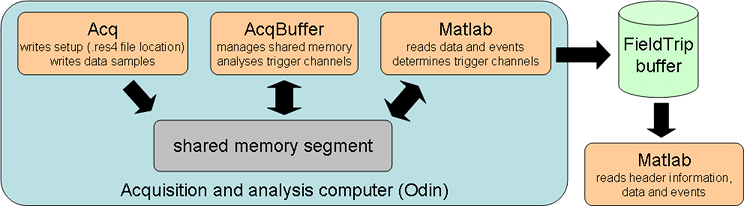
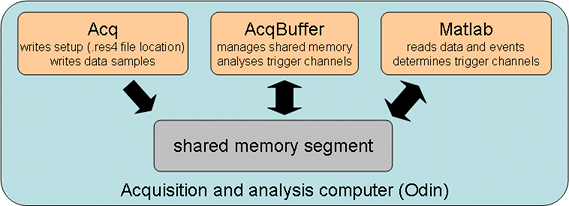
Besides maintaining the copy of the setup packet and ensuring that there are always some packets free to receive the new data from Acq, the AcqBuffer application also performs trigger detection on indicated channels and stores these triggers in a convenient representation. This speeds up the trigger detection in the read_event function in MATLAB considerably.
In MATLAB the full header details of the MEG data set are determined by first reading the packet containing the setup information (i.e. the name of the res4 file) and subsequently by reading the details from that res4 file using the standard reading function. The number of samples available in the dataset is updated to reflect the amount of data present in the buffer.
After you start
>> ctf2ft_v1
on the Linux command line, and in another terminal
>> Acq
You can access the data in MATLAB like this
hdr    = ft_read_header(filename), this returns a structure with the header information
event  = ft_read_event(filename), this returns a structure with the event information, (i.e. the triggers)
dat    = ft_read_data(filename, ...), this returns a 2-D or 3-D array with the data
where filename should be a string containing ctf_shm://, i.e. similar as a Universal Resource Identifier. In case you want to use the header information from another res4 file, you can specify the filename as ctf_shm://<dataset.res4>, i.e. including the full path and filename of the res4 header file.
The (inter-)operation of the three involved software components, all running on the same machine can be summarized with the following diagram.
Known problems with CTF real-time acquisition
Different software versions
In 2016 CTF finalized the design for the 3000-series of the electronics (see CTF news). The new electronics does all processing on the acquisition computer, in contrast to the 2000-series electronics that does part of the processing on a 4-node compute cluster that is mounted in the electronics rack.
The new electronics comes with a new (beta) version of the acquisition software. However, that software can also be used in combination with the 2000-series electronics. This requires installing a new acquisition computer which bypasses the 4-node compute cluster.
Regardless whether you have the 3000-series electronics or not, the new version of the software (probably version 6.x and up) has the same shared-memory interface.
Whereas in the software version 6.1.5-el6_7.x86_64-20160720-3344 the ACQ_BUFFER_SIZE was changed from 28160 into 40000, and the scaling of the HLC channels seems to be off in this version, the more recent software version 6.1.14-beta-el6_8.x86_64-20180116-3847 writes the data to shared memory in the original format with 28160 samples per packet. Please look in the code ctf.h and adjust the ACQ_BUFFER_SIZE for your software version.
shmget: Invalid argument
It seems that the default Linux/RedHat configuration of the shared memory does not allow a sufficiently large memory block to be allocated. To change the setting in the operating system, you should do (as root user
echo 1000000000 > /proc/sys/kernel/shmmax
There appears to be two ways of (re)defining the amount of shared memory in your system (tips thanks to Dave Glowacki of SSEC):
Add this line to your /etc/rc.d/rc.local file:
echo shared_memory_size > /proc/sys/kernel/shmmax
(where shared_memory_size is the amount of shared memory you want to declare in bytes) and reboot.
A more permanent solution would be to change the value of SHMMAX in /usr/src/linux/include/asm/shmparam.h and rebuild your kernel.
Number of channels
There is a problem in the CTF acquisition software that sometimes causes the shared memory interface to fail. The diagnosis of the problem is that the Acq software runs and writes the data to the shared-memory buffer, where it is detected by AcqBuffer, and that after a certain random amount of time (around one minute) the AcqBuffer stops. The problem seems to be caused by a memory buffer overrun. The shared memory consists of 600 packets, each defined as
typedef struct {
   ACQ_MessageType message_type; % this is 4 bytes long
   int messageId;
   int sampleNumber;
   int numSamples;
   int numChannels;
   int data[28160];
} ACQ_MessagePacketType;
So in total each packet is 5*4+28160*4 bytes long, and there are 600 of those in shared memory. If the numChannels*numSamples of the previous block is slightly larger than 28160, it means that Acq is trying to write more data points into the “data” section of that packet than fits in, causing the data to flow over into the next packet. The first couple of integers in the next packet (indicating the Type and other details) are therefore messed up, and Acq thinks that that packet is already filled. Then it stops writing to shared memory altogether.
I have tested this idea with a specially tweaked version of my AcqBuffer shared memory “maintenance” program and indeed see this happen for a data block that has 91*310=28210 samples in it, which is 50 more than the 28160 that would fit in. The next block is therefore corrupt.
Now understanding the problem, we can start thinking about a solution. Somehow in the CTF code there is an incorrect estimate of the number of samples that fits into a block. Probably we can play with the channel number to circumvent the problem. Given a certain channel number, Acq will have to determine how many samples fit into a single block. I suspect the bug in the Acq code to be something like
sampleNumber = round(28160/numChannels)
where it should be
sampleNumber = floor(28160/numChannels)
i.e., rounding off to the bottom. To solve this, we can look at
for chancount=1:500
  success(chancount) = ((round(28160/chancount).*chancount)<=28160);
end

>> find(success)
ans =
  1     2     4     5     6     8    10    11    13    14    15    16    17    18    19    20    22    23    24    25    26    29   31    32    33    34    36    37    38    39    40    42    44    46    47    50    51    53    54    55    57    59    60    62    64    65    67    68    69    70    72    75    78    79    80    82    83    84    85    86    88    89    91    92    95    96    97    98    99   102   103   105   107   109   110   112   113   114   124   125   126   128   129   132   134   136   138   140   142   145   148   151   152   153   157   158   159   160   176   177   178   179   180   184   185   186   190   191   194   195   198   201   202   204   205   207   208   210   211   213   216   218   220   221   223   225   227   230   232   234   236   238   240   242   244   246   247   249   251   253   255   256   258   260   262   263   265   267   268   270   273   275   276   278   281   284   286   287   289   290   292   293   295   296   298   299   302   305   306   308   309   312   315   316   319   320   322   323   326   327   330   331   334   335   338   339   342   343   346   347   350   351   352   355   356   359   360   361   364   365   369   370   373   374   375   378   379   380   384   385   389   390   391   394   395   396   400   401   402   406   407   408   412   413   414   418   419   420   424   425   426   430   431   432   433   437   438   439   440   444   445   446   451   452   453   454   458   459   460   461   466   467   468   469   474   475   476   477   482   483   484   485   490   491   492   493   494   499   500
Update: This calculation seems not to be 100% correct. For example, 359 channels do NOT work. 360 seems to be okay.
This is the table (up to 500 channels) that lists the number of channels for which it will work. The test that I performed happened to be with 310 channels, which is not in the list. Since we can always add a few (unused) EEG channels to the acquisition, we can work around the bug in the CF Acq software.